
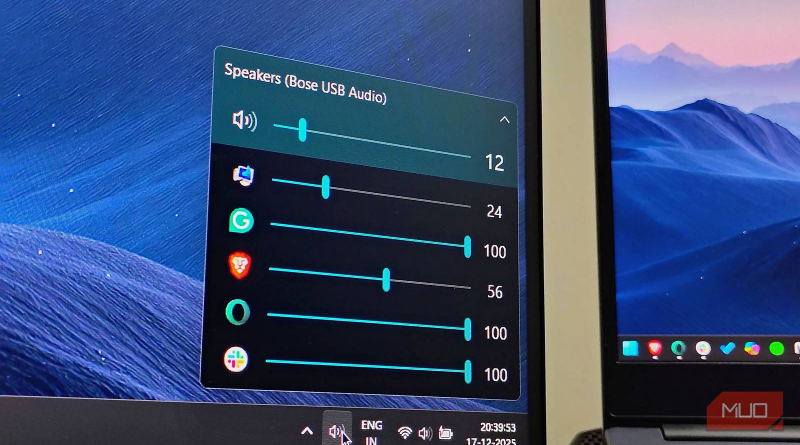
EarTrumpet Review 2026: The Free Windows Per-App Volume Mixer
Verdict: EarTrumpet is still the best free per-app Windows volume mixer in 2026 — faster and clearer than digging through Settings. Install it if you routinely juggle browser tabs, games, Discord, and meetings; skip only if the modern Windows 11 mixer already feels perfect.
Best for: Windows 10/11 users, streamers, and multitaskers who need instant per-app volume and output switching from the system tray.
Not for: People who never change app volumes, or locked-down corporate PCs that block Microsoft Store / third-party utilities.
Researched 2026 overview based on public product/pricing pages — not a logged hands-on lab of every feature.
What it is
EarTrumpet is an open-source volume control app for Windows. It lives in the system tray and shows per-application volume sliders, peak meters, and playback-device controls so you can quiet a noisy browser tab without muting your meeting — or move one app to headphones while another stays on speakers.
Microsoft has improved the built-in Windows 11 mixer over recent years (widely noted as “Sherlocking” EarTrumpet’s ideas), yet reviewers through 2026 still recommend EarTrumpet for speed, clarity, and per-app device routing that feels one click closer than stock UI.
Who it’s for
Anyone running music + video call + notifications at once. Gamers balancing game audio and Discord. Editors monitoring multiple preview windows. Support agents flipping between softphone and training videos. Power users who keep Winget/Chocolatey packs of essential free utilities — EarTrumpet belongs on that list. It is especially helpful on multi-monitor desks where the default Sound settings window feels a detour from the tray.
Strengths
- Per-app volume in one flyout: No scavenger hunt through Settings → System → Sound.
- Move apps between devices: Send Spotify to speakers and Zoom to a headset without restarting apps (when Windows session routing allows).
- Free and open source: Microsoft Store, Winget (
winget install File-New-Project.EarTrumpet), or Chocolatey — no subscription. - Modern UI: Light/dark and accent-aware; feels native rather than legacy Win32 chrome.
- Hotkeys and mixer window: Configurable shortcuts and a standalone mixer for deeper control.
- Store updates: Microsoft Store installs get automatic updates without hunting GitHub releases.
Trade-offs / Limits
- Windows 11’s built-in mixer closed much of the gap — try stock first for 10 minutes before installing anything.
- Another tray icon (ironically) — tidy users may hide it after setup.
- Corporate image restrictions may block Store apps; request IT exception or use approved deploy methods.
- It does not replace audio drivers, EQ suites, or virtual cable routing tools like Voicemeeter for complex stream setups.
- Feature pace is mature/utility-stable rather than flashy monthly launches — a plus for reliability, not for novelty seekers.
- Edge cases with exclusive-mode audio, some games, or exotic virtual devices may still need the classic Windows mixer or vendor panels.
Pricing
Free. Distributed via the Microsoft Store and GitHub (File-New-Project/EarTrumpet), with package-manager installs via Winget and Chocolatey. No paid tier. Updates typically flow through the Store when installed that way. Donate to maintainers if you rely on it daily — optional, not required.
Verdict / Who should buy
You do not buy EarTrumpet — you install it. Do so if per-app volume is a weekly friction on Windows. If the native Windows 11 mixer already solves your cases, stay stock. Pair with a good headset and, for call noise, software like Krisp or hardware mics. For free Windows quality-of-life tools, EarTrumpet remains a first-week install in 2026.