
Alfred Review 2026: Still the Power-User Mac Launcher
Verdict: Alfred is still the power-user Mac launcher when you want deep workflows, clipboard history, and a one-time Powerpack instead of a subscription. Raycast wins on modern free-tier breadth and built-in AI; Alfred wins on ownership, maturity, and AppleScript-depth automation.
Best for: Mac users who live in keyboard workflows, snippets, and custom automations — especially anyone with a library of Alfred workflows already.
Not for: People who want launcher AI chat and a huge extension store with zero learning curve, and who do not mind a Pro subscription.
Researched 2026 overview based on public product/pricing pages — not a logged hands-on lab of every feature.
What it is
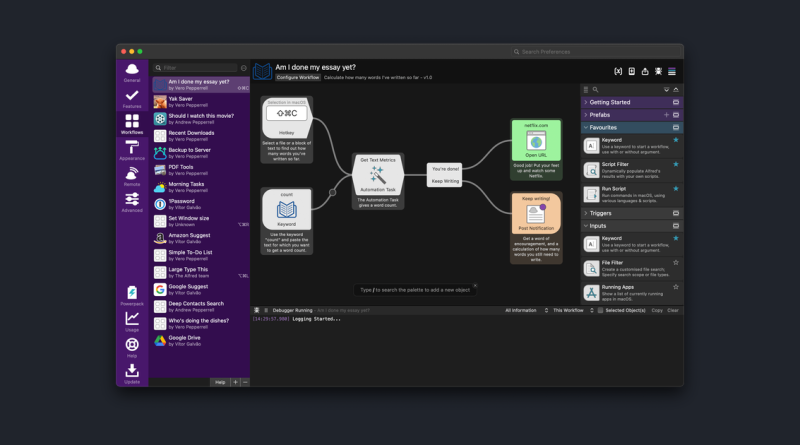
Alfred replaces and extends Spotlight: launch apps, search files and the web, run calculator queries, then — with the Powerpack — unlock workflows, clipboard history, snippets, file actions, themes, and sync. Version 5.x continues the visual workflow editor that chains triggers, filters, scripts, and Automation Tasks without forcing you into a full IDE.
The free app is a capable launcher. The Powerpack is the product most veterans mean when they “use Alfred.” Rich Text and Grid views in recent 5.x releases push results beyond a plain list, which helps when browsing files or Markdown previews from the keyboard.
Who it’s for
Developers, operators, and writers who open tools, paste structured text, and jump between folders dozens of times a day. It also suits privacy-conscious users who prefer a local tool with no mandatory account. If you already invested years in Alfred workflows, migration cost alone can justify staying. Corporate teams can look at Alfred’s business licensing when shared Macs are not the model and each person needs their own activation.
Strengths
- Workflow depth: Block-based workflows plus shell, AppleScript, JavaScript, and Python hooks cover remaps that GUI launchers cannot express cleanly.
- One-time Powerpack: Public shop pricing lists a Single License around £34 for the current major version and Mega Supporter around £59 with free lifetime upgrades — confirm on the live shop.
- Clipboard and snippets: Unlimited history for text, images, and paths, plus auto-expanding snippets, remain daily drivers.
- Local and account-light: No forced cloud identity for core use; sync via Dropbox or similar if you choose.
- Community longevity: Gallery and forum workflows for music, developer tools, and system tasks still matter in 2026.
Trade-offs / Limits
- Raycast’s free tier includes clipboard, snippets, and window tools that Alfred parks behind Powerpack — newcomers often start on Raycast for that reason.
- No first-party AI chat inside Alfred; community workflows can call external APIs, but Raycast ships AI more natively.
- Workflow discovery is less “app store” and more gallery or forum — powerful, occasionally messy.
- Feature velocity looks slower than Raycast’s 2025–2026 shipping pace; Alfred trades novelty for stability.
Pricing
Free core launcher. Powerpack is a one-time purchase from alfredapp.com/powerpack (publicly about £34 Single / £59 Mega Supporter). Corporate licensing exists for teams. Confirm currency and upgrade rules on the shop page before buying.
Verdict / Who should buy
Buy Alfred Powerpack if you want to own a deep Mac automation hub without rent. Prefer Mega Supporter if you plan to stay for multiple major versions. Choose Raycast if you want free clipboard and snippets today plus optional AI Pro. Many power users keep both briefly, then commit — Alfred still earns its seat when workflows and one-time pricing are the decision criteria. If you are starting from zero in 2026, trial Raycast free for a week, then buy Alfred only if you hit a workflow wall Raycast cannot clear.