
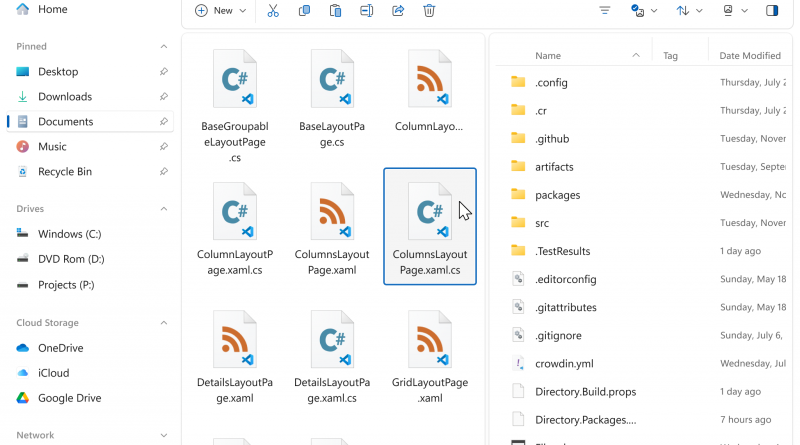
Files review: a modern Windows file manager that is finally mature enough to recommend
Review approach: This is a researched review built from official product pages, documentation, pricing pages, and release materials rather than a fresh hands-on lab test.
Alternative file managers often fail in one of two ways: they either look nicer than the default but do not improve much, or they add power-user features without becoming stable enough for everyday trust. Files is more interesting now because it seems increasingly determined to clear both bars.
The app’s recent releases, documentation, and feature set suggest a product that has grown out of mere novelty. It is a focused attempt to make file management on Windows more flexible, more visual, and more keyboard-friendly without severing users from familiar file-system behavior.
What the product actually does
Files is an open-source Windows file manager with tabs, dual pane, tags, preview options, cloud integration, command palette support, and advanced customization. The official docs also describe an optional registry-based workaround for making Files act as the default file manager in place of Explorer for common actions.
That last point matters because it reveals the ambition of the project. Files is not only trying to be a companion app. It is trying to be good enough that users may actually want it to sit closer to the center of the Windows experience.
What stands out
Several strengths now look mature rather than aspirational.
- Tabs and dual pane workflows are front-and-center, not bolted on.
- The command palette, tagging, preview, and layout options make organization genuinely more flexible than stock Explorer.
- The project is open source and updated actively, which increases transparency and momentum.
- Recent releases show real attention to navigation details rather than only visual polish.
Pricing, platforms, and practical limits
Files is free and open source, though the project also offers ways to support development through the Microsoft Store or sponsorship. That is a generous starting point for users who want to test whether the workflow fit is real before committing to any replacement behavior.
The practical limit is that replacing a default file manager is always a higher-trust decision than installing a launcher or clipboard tool. Users should expect some edge cases and weigh how much they value advanced panes, tags, and command access.
Where caution is still warranted
- Changing the default file manager relies on a registry workaround, which the Files team explicitly says should be approached with care.
- Users who rarely go beyond basic folder browsing may not benefit enough from the extra surface area.
- Open-source momentum is a strength, but long-term polish still depends on sustained maintenance and community energy.
Who it suits best
Files suits Windows users who spend meaningful time moving assets, comparing directories, tagging work, or opening several locations at once and who increasingly feel constrained by stock Explorer.
It is especially appealing for people who like modern interfaces but still want power-user depth rather than a simplified shell.
Verdict
Based on the current official materials, Files now looks mature enough to recommend seriously. It will not be the right choice for everyone, but it is one of the clearest examples of indie Windows software getting stronger by focusing on the real work rather than on gimmicks.