
WizTree Review 2026: Still the Fastest Windows Disk Space Finder
# WizTree Review 2026: Still the Fastest Windows Disk Space Finder
**Verdict:** WizTree remains the default free Windows tool for finding what is eating your drive. Use it before you buy more storage or reinstall Windows. It is not a full backup suite or a Mac/Linux disk manager.
**Best for:** Windows power users, content creators with multi-terabyte disks, and IT techs cleaning client PCs.
**Not for:** People who only need Storage Sense suggestions, or anyone on macOS/Linux looking for a cross-platform GUI.
*Researched 2026 overview based on Disk Analyzer / Antibody Software public materials — not a timed bench of every drive in a lab.*
## What WizTree is
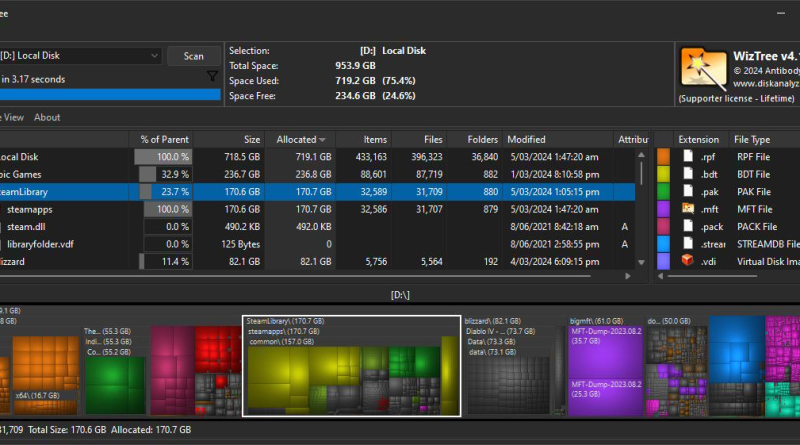
WizTree is a high-speed disk space analyzer for Windows from Antibody Software, distributed at [diskanalyzer.com](https://diskanalyzer.com/) (also linked as wiztree.com in common shorthand). It shows which files and folders consume the most space using a treemap and sortable file lists. On NTFS volumes it reads the Master File Table (MFT) directly instead of walking every file through slow Windows APIs — that is why scans often finish in seconds on large drives.
It supports NTFS, FAT/FAT32, network shares, USB drives, and related Windows-accessible storage; recent builds note Windows on Arm via Prism emulation. Features include duplicate detection (name/size, optionally date), search/filters with wildcards, CSV export, MFT export/import, command-line automation, and a portable build. Personal use is free; commercial licensing exists for business contexts — confirm current license terms on the official site before deploying in a company image.
## What works well
– **MFT speed.** Multi-terabyte NTFS scans that feel instant compared with classic folder walkers.
– **Treemap intuition.** Big blocks equal big problems — easy to spot installers, old VMs, and forgotten video folders.
– **Duplicates and filters.** Find copies and pattern-match extensions (`.iso`, `.mov`, `.zip`) quickly.
– **CSV + CLI.** Scriptable exports for audits and before/after cleanup reports.
– **Portable option.** Run from a USB stick on a client machine without a full install.
## What frustrates
– **Admin rights for MFT.** Fastest path often needs elevation; without it you fall back to slower methods.
– **Delete carefully.** WizTree helps you find hogs; it does not replace judgment — system files and app data can look “large and deletable” when they are not.
– **Windows-only.** No native Mac/Linux edition.
– **UI is utilitarian.** Effective, not fashionable — that is fine for a disk tool.
## WizTree vs WinDirStat / TreeSize / Storage Sense (practical)
| Need | Lean toward |
| — | — |
| Fastest NTFS overview | WizTree |
| Classic treemap nostalgia | WinDirStat |
| Extra enterprise disk reporting | TreeSize (paid editions) |
| Simple OS suggestions only | Windows Storage Sense |
## Who should use it
– **Yes:** Anyone whose C: or media drive is mysteriously full.
– **Maybe:** Helpdesk techs — excellent first diagnostic before deeper tools.
– **No:** Users who never manage local files (cloud-only Chromebooks, etc.).
## Applorable take
Before you buy a bigger SSD, run WizTree. Sort by size, export a CSV if you need a paper trail, delete with Explorer after you confirm paths, and empty Recycle Bin. Keep the portable build on your tech USB. For personal Windows machines it is still one of the highest-ROI free utilities you can install in 2026.
Pair WizTree with a boring cleanup ritual: scan, sort, export CSV, delete known-safe downloads and old ISOs, reboot, rescan. For company PCs, follow your change policy — free personal use does not automatically mean free unlimited commercial deployment, so check Antibody Software’s current license page.
If a scan looks empty or incomplete, confirm you launched elevated and selected the correct volume — network shares and some non-NTFS paths will always be slower than a local MFT read.
Disclosure: No affiliate links in this review.